Playback, connections, and artwork have different lifetimes
I built this personal tool to show the current Apple Music track, album, and playback progress in Discord. Native playback data, the Discord connection, and network artwork lookups can start, stop, or complete independently.
Track changes and seeks must replace earlier state, and restarting Discord must republish the current track. Installation also needed to work without a separate Node.js installation or developer application setup.
Separate native collection, publishing, and desktop delivery
Normalize platform data into one playback snapshot
A Swift helper uses ScriptingBridge on macOS; a PowerShell helper finds Apple Music through Windows media-session APIs. Both emit the same state, track, artist, album, duration, and position fields.
The TypeScript watcher reads helper output line by line and passes shared snapshots to the activity formatter. Unexpected helper exits trigger a restart, separating platform collection from Discord publishing.
Recover the connection and republish current state
I implemented local Discord IPC framing and slot discovery for Unix sockets and Windows named pipes. Failed connections use retry backoff with jitter.
A ready event clears the previous publication signature and sends the latest snapshot. Signature comparisons reduce duplicate activity updates, while track changes, play and pause transitions, and detected seeks trigger publication. Start and end timestamps derive progress from the current playback position.
Keep artwork optional and reject stale responses
Text activity is published before the asynchronous iTunes artwork lookup. A generation check prevents an earlier track’s late response from updating the current activity.
Search results are checked against artist, title, album, and duration. Regional failures fall through to alternate catalogs and queries. Album-only matches can provide artwork without creating a song link. Successful and empty results are cached, and playback publication continues without artwork.
Apply local display settings without a restart
The settings interface previews activity and controls album information, artwork, progress, pause visibility, and metadata order. Saved changes immediately republish the current activity.
The server binds to a local address and checks the Origin and JSON format of settings changes. English and Korean interfaces preserve unsaved options when switching language and keep track metadata separate from interface translation.
Deliver a desktop lifecycle and installable packages
The macOS menu bar and Windows tray expose settings, connection status, reconnect, logs, and launch-at-login controls. The desktop host owns the background worker so quitting also stops publication.
Release ZIPs bundle Node.js and use a shared public Discord Application ID by default. A tag-based workflow verifies and packages both platforms before publishing their files together. The Windows installer also checks extraction and required files.
A published desktop tool with visible implementation evidence
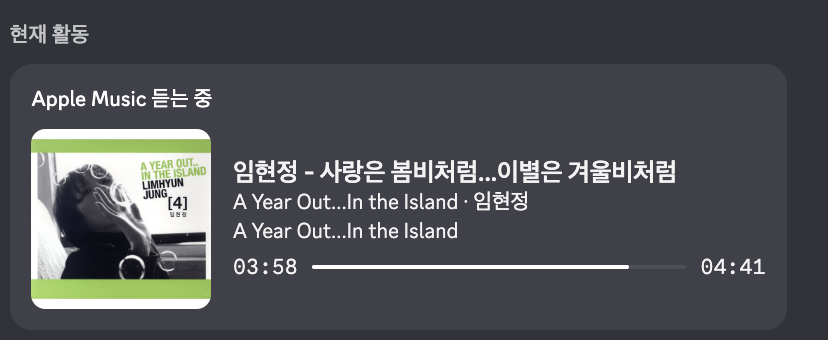
The v0.8.0 release provides installation ZIPs for macOS Apple Silicon and Windows x64. The product site and settings interface support Korean and English. The capture below shows track information, artwork, and progress in Discord on macOS.
Tests cover activity formatting, timestamps, IPC frames and paths, artwork matching, and local settings boundaries. The project connects native integration, recovery, settings UI, and installation and release workflows in one local tool.
Trace
- macOS + Windows
- Platform collectors and a shared playback model
- Local IPC
- Unix sockets and Windows named pipes
- v0.8.0
- Published installation ZIPs for both platformsReleased October 25, 2026